| Author | Message |
|---|
ToxicTrashAlarm
Advanced Vidder
Joined: 22 Feb 2008
Posts: 1089
|
 Posted: Tue Aug 26, 2008 6:40 pm Posted: Tue Aug 26, 2008 6:40 pm |
|
Hello there! Only just got Sony Vegas today and I'm ALREADY stuck ;P
I seem to have created some sort of 'Loop Region' which messes up the song sometimes 
Its quite annoying and I really have no idea how to get rid of it.
This may seem like basic knowledge but I'm a newbie to Vegas!
Please help me!!
_________________
Avatar by Jourdan and banner by Deia! =D |
|
| Back to top | |
 |
KajaM
Expert Vidder
Joined: 28 Jun 2005
Posts: 10438
|
| Posted: Tue Aug 26, 2008 6:57 pm |
|
Have you tried this:
Right-click on the audio track, then "switches" and then uncheck the "loop" option (if it's checked)?
_________________
 |
|
| Back to top | |
|
ToxicTrashAlarm
Advanced Vidder
Joined: 22 Feb 2008
Posts: 1089
|
| Posted: Tue Aug 26, 2008 7:01 pm |
|
Ahh thank you! 
_________________
Avatar by Jourdan and banner by Deia! =D |
|
| Back to top | |
|
KajaM
Expert Vidder
Joined: 28 Jun 2005
Posts: 10438
|
| Posted: Tue Aug 26, 2008 7:21 pm |
|
You're welcome. Did it fix the problem? (Cause that's the only "loop" option I know in Vegas  ) )
_________________
|
|
| Back to top | |
|
ToxicTrashAlarm
Advanced Vidder
Joined: 22 Feb 2008
Posts: 1089
|
| Posted: Tue Aug 26, 2008 7:27 pm |
|
Yeah its gone now. Hopefully I won't make that mistake again lol ;P
_________________
Avatar by Jourdan and banner by Deia! =D |
|
| Back to top | |
|
KajaM
Expert Vidder
Joined: 28 Jun 2005
Posts: 10438
|
| Posted: Tue Aug 26, 2008 7:34 pm |
|
I don't know if there's any option to switch the looping off (you might try and ask Paul, he knows a lot about Vegas). It happens to me, too, when I try to cut a song down. In the worst case, you might just have to check it again when you start a new vidding or try to cut a song down.
_________________
|
|
| Back to top | |
|
ToxicTrashAlarm
Advanced Vidder
Joined: 22 Feb 2008
Posts: 1089
|
| Posted: Thu Aug 28, 2008 5:08 pm |
|
Hey again ;P
You may have to get use to me asking here now I'm new to Vegas!
I was wondering if anyone could tell me how to get this effect. I'm really not sure how to explain it, or whats it called, so I'll show you from someone else's video.
Say Kat's for example:
http://www.youtube.com/watch?v=9hSLZbC0ac8
The effect is at 38 seconds to about 43.
I'm sure there are more in the video, but thats the first one I picked up on.
If someone has already explained this before, please direct me to where it is in the forum 
Thanks! 
_________________
Avatar by Jourdan and banner by Deia! =D |
|
| Back to top | |
|
littleton_pace
Council Member

Joined: 16 Nov 2006
Posts: 55699
|
| Posted: Fri Aug 29, 2008 5:33 am |
|
hey chelsea ;P
that's just a simple overlay  in that case, i took the same clip. I put one on the top timeline and one below it in the exact same spot. The top one I cropped to make it closer and then changed the opacity to make it a little bit see-through. in that case, i took the same clip. I put one on the top timeline and one below it in the exact same spot. The top one I cropped to make it closer and then changed the opacity to make it a little bit see-through.
to crop you just hit the pan/crop button which is in the bottom right corner of the clip. and to change opacity just click and drag from the top of the clip and drag down and the opacity line should appear
_________________

 |
|
| Back to top | |
|
Aislynn
Council Member
Joined: 03 Feb 2005
Posts: 35782
|
| Posted: Fri Aug 29, 2008 5:55 am |
|
| littleton_pace wrote: | | ok, Compositing Mode. Is there a way to get it on a single clip only? The way I'm doing it now is the whole timeline but that sucks cos then every clip has to have an overlay or you can't see it :S and I just want to overlay some clips; is there a way to add a compositing mode onto just one clip? |
Not as far as I know, I think you'd just have to create more tracks then and put the clips you want composited on one and the rest on others. Of course, Movie Studio is very limited when it comes to compositing so I don't know too much about it. It literally can only do one type of alpha channel overlay that just pretty much turns everything so dark it's useless. I wish it could do all of the burn, screen, hard light-ish things that Paintshop can do, 'cause I get a ton of use out of those and I'd love to be able to incorporate some of that into my vids!
Wow, unhelpful!answer is unhelpful, huh? Sorry!  But I just caught your post and didn't want you to think it had been just totally ignored! But I just caught your post and didn't want you to think it had been just totally ignored!   |
|
| Back to top | |
|
Fjorton
Advanced Vidder

Joined: 13 Apr 2008
Posts: 120
|
| Posted: Sat Aug 30, 2008 12:21 pm |
|
| Can anyone tell me how i can take a photo from the screen in vegas, please? |
|
| Back to top | |
|
cagedfreedom
Expert Vidder

Joined: 24 Feb 2008
Posts: 1855
|
| Posted: Sat Aug 30, 2008 2:12 pm |
|
Sure when you have the frame that you want showing in the viewing box to the right, just click on the 'Save' button above and it saves that freezeframe as a picture that you can open into Vegas and place in timeline
Like this:
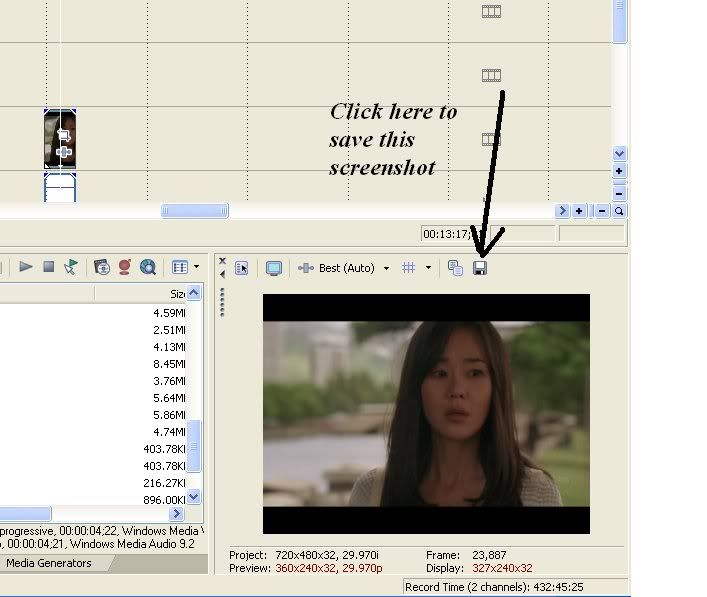
Hope that's what you meant
_________________

 |
|
| Back to top | |
|
Fjorton
Advanced Vidder
Joined: 13 Apr 2008
Posts: 120
|
| Posted: Sat Aug 30, 2008 2:52 pm |
|
| Thanks, that was exactly what i ment |
|
| Back to top | |
|
Charlies_Innocence
Expert Vidder

Joined: 24 Nov 2007
Posts: 4410
|
| Posted: Mon Sep 1, 2008 7:20 pm |
|
Okay, so I've seen this effect in a couple vids and I'm not sure how to do it... It's like, for the coloring, you have two colors overlayed over the vid? Lol, I'm probably not explaining very well... It's like the coloring in Morgan's No Air vid. Can someone explain how to do that? Thanks!
_________________
icon by becca |
|
| Back to top | |
|
Aislynn
Council Member
Joined: 03 Feb 2005
Posts: 35782
|
| Posted: Mon Sep 1, 2008 9:29 pm |
|
Hey, Elyse! I believe that's a gradient (either a customized on that's under the Media Generator tab or one that was imported as a still picture) on a timeline over the rest of the vid, then you use compositing on that track to get different looks (kinda like you can do in graphics programs like Paintshop or Photoshop). But I'm not 100% sure because Vegas Movie Studio can only do one form of compositing that I've never found a way to use.
By the way, the compositing controls are on the track itself, the little symbol that kinda looks like a film strip with another one in front of it, to the right of the slider that controls the Level.
Hopefully Morgan will see this and can tell us how she did that cool effect! |
|
| Back to top | |
|
ToxicTrashAlarm
Advanced Vidder
Joined: 22 Feb 2008
Posts: 1089
|
| Posted: Mon Sep 1, 2008 9:36 pm |
|
| littleton_pace wrote: |
that's just a simple overlay in that case, i took the same clip. I put one on the top timeline and one below it in the exact same spot. The top one I cropped to make it closer and then changed the opacity to make it a little bit see-through.
to crop you just hit the pan/crop button which is in the bottom right corner of the clip. and to change opacity just click and drag from the top of the clip and drag down and the opacity line should appear |
Thanks Kat
I'll try it in my next vid
_________________
Avatar by Jourdan and banner by Deia! =D |
|
| Back to top | |
|

 LVI Home
 Search
 Memberlist