littleton_pace
Council Member
Joined: 16 Nov 2006
Posts: 55699
|
 Posted: Sat Apr 27, 2013 4:18 am Posted: Sat Apr 27, 2013 4:18 am |
|
Im running with Windows 7 64-bit, and to get my AVI files working I use Avic:
http://www.4shared.com/file/xC7wi046/AviC.html
Once its downloaded, load in the file that's giving you trouble in vegas and you should get something that looks like this, the letters might be in caps or lowercase:
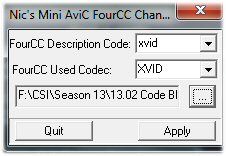
Leave the FourCC Description code, but where it says FourCC Used Codec, reverse what is written in the FourCC Description code. So for example, the file that I used would go from this:
To this:
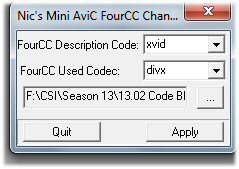
Caps are important, make them all lower case!
Click Apply and then the file should work, audio and video, in Vegas  Lemme know how it works for you, or if you need more explaining Lemme know how it works for you, or if you need more explaining |
|

 LVI Home
 Search
 Memberlist
