| Author | Message |
|---|
Wildcat
Expert Vidder
Joined: 06 Jun 2005
Posts: 610
|
 Posted: Thu Nov 24, 2011 2:04 am Post subject: Sony vegas overlay issue Posted: Thu Nov 24, 2011 2:04 am Post subject: Sony vegas overlay issue |
|
I'm trying to overlay a clip onto another clip without lowering the Opacity itself, but using the Composing Mode instead after adding another Video track and putting the clip over the other clip...
The issue I'm having is, I want the top clip to change and keep all the other ones from changing. Whenever I try to change the top clip, the others turn darker/different too... if I want to use, let's say "overlay" or "burn" for the top clip, but only the top clip.
I normally use Cookie Cutter or lower the Opacity for a lot of overlay type of stuff but I thought I'd try out different ways to add the overlay effect. |
|
| Back to top | |
 |
littleton_pace
Council Member
Joined: 16 Nov 2006
Posts: 55699
|
| Posted: Thu Nov 24, 2011 6:36 am |
|
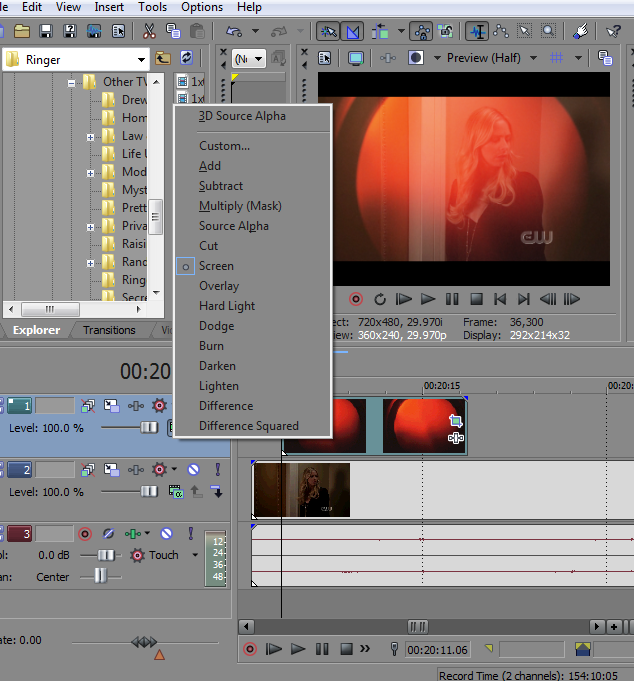
I've had this issue too; in Compositing Mode select Screen  That lets the overlay effect just on one clip and leaves the others as they are That lets the overlay effect just on one clip and leaves the others as they are |
|
| Back to top | |
|
Wildcat
Expert Vidder
Joined: 06 Jun 2005
Posts: 610
|
| Posted: Thu Nov 24, 2011 6:49 am |
|
| Thanks, I will try that. if in case it doesn't work, would you post a screen shot of how it looks (settings) for you so I can see what I might be doing wrong? I will try it first and let u know the outcome. |
|
| Back to top | |
|
littleton_pace
Council Member
Joined: 16 Nov 2006
Posts: 55699
|
| Posted: Thu Nov 24, 2011 7:19 am |
|
Sure, this is what it shoud look like before you change to Screen.
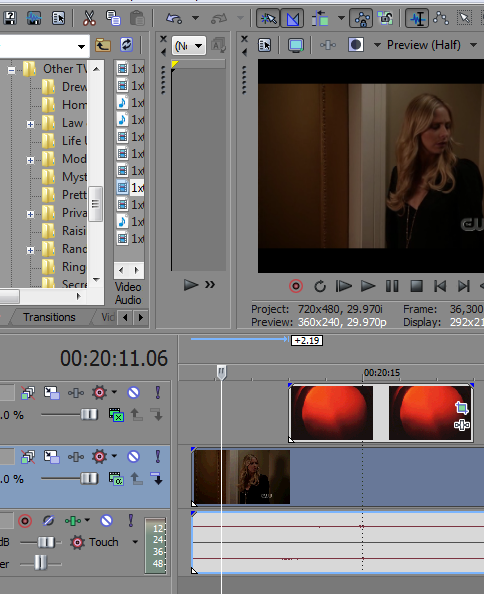
Then this is what it should look like when you've selected screen mode.
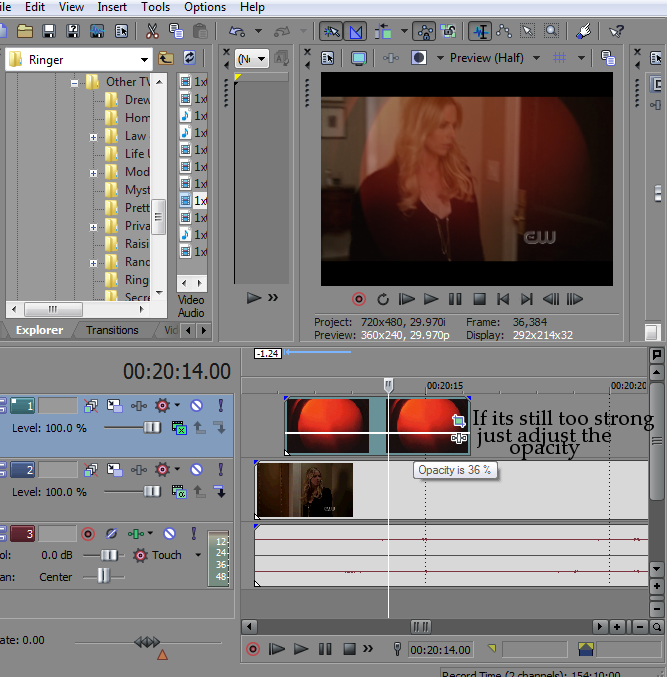
and if the overlay is too strong just mess with the opacity a little.
 |
|
| Back to top | |
|
grable24
Expert Vidder
Joined: 12 Mar 2010
Posts: 465
|
| Posted: Tue Dec 6, 2011 12:38 am |
|
| also... if you click on the little "cogweel" looking icon, that allows you to make the track disabled on sections of the timeline. |
|
| Back to top | |
|
Wildcat
Expert Vidder
Joined: 06 Jun 2005
Posts: 610
|
| Posted: Sat Dec 10, 2011 5:17 am |
|
| Thank you, both. It worked |
|
| Back to top | |
|

 LVI Home
 Search
 Memberlist