| Author | Message |
|---|
scarlett_106
Advanced Vidder
Joined: 20 Mar 2011
Posts: 169
|
 Posted: Thu Jun 23, 2011 11:04 pm Post subject: Using a mix of widescreen and "square" clips - hel Posted: Thu Jun 23, 2011 11:04 pm Post subject: Using a mix of widescreen and "square" clips - hel |
|
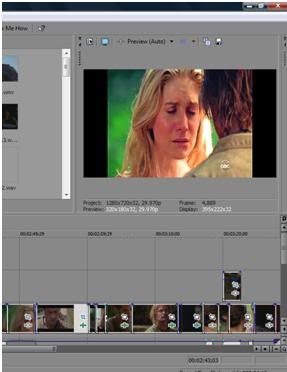
Hi guys, so I'm almost done with my Jate/Suliet vid, and the only problem is that some of my clips were widescreen and some were TV aspect, so square. That means that in the latter, there are those ugly black gutters. It kind of ruins the flow of the video.
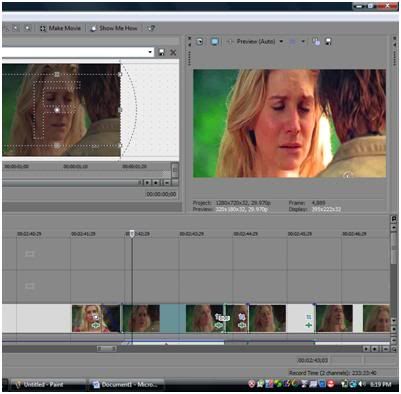
But when I change them to widescreen in the Pan/Crop window, it takes out part of the image and zooms in too much. For instance, I did it to a Suliet clip, and it was way too close in on Juliet's face and cut out part of her head.
Any ideas for making all the clips in the same format without having to sacrifice part of the image? Is there a way to convert them outside of Vegas?
Thanks!!
This is how it is when I have it normal:
And this is how it is when I do widescreen:
Last edited by scarlett_106 on Thu Jun 23, 2011 11:26 pm; edited 2 times in total |
|
| Back to top | |
 |
Belle MacFarlane
Expert Vidder
Joined: 02 Sep 2009
Posts: 7771
|
| Posted: Thu Jun 23, 2011 11:23 pm |
|
The only other alternative is to stretch the square clips out, but that gives a very squashed look. Honestly I don't think there's a better way than cutting out some of the image but if anyone has a magic method I'd also love to hear it  |
|
| Back to top | |
|
Debbie
Expert Vidder
Joined: 11 Jul 2009
Posts: 4987
|
| Posted: Fri Jun 24, 2011 12:07 am |
|
| Whenever I used to work with clips like that, I'd stick with widescreen. It honestly doesn't ruin it, unless the focus should be on a part that it cuts off which it usually isn't! From what I can see, it looks absolutely fine |
|
| Back to top | |
|
littleton_pace
Council Member
Joined: 16 Nov 2006
Posts: 55699
|
| Posted: Fri Jun 24, 2011 2:35 am |
|
| it depends on how the actual clip is when it comes off the DVD. like my Lost eps I rip off in widescreen so nothing is cut out. but with Charmed, they are all by default square which is annoying, i just change them to widescreen in vegas and cut out some of it |
|
| Back to top | |
|
nikkimonique
Expert Vidder
Joined: 27 Jul 2007
Posts: 30478
|
| Posted: Fri Jun 24, 2011 3:57 am |
|
| yeah in final cut the only thing I can do when I use square clips is to zoom in to make it fit the screen which sucks but I don't know another way around it. I'd rather zoom in a little than make the video looks stretched or squished! |
|
| Back to top | |
|
eloramoon
Council Member
Joined: 24 Feb 2008
Posts: 9077
|
| Posted: Fri Jun 24, 2011 4:13 am |
|
| I think it's better to lose some of the image off the top and bottom than to have the black bars at the edges in some clips. You can also move the pan/crop area up so that it doesn't cut off the top of her head but cuts off more of their chests/shoulders. Although, I realize in the example clip that wouldn't really work, but that's what I usually do when it works out. I just adjust it to where I'm happiest with it. |
|
| Back to top | |
|
Aislynn
Council Member
Joined: 03 Feb 2005
Posts: 35782
|
| Posted: Fri Jun 24, 2011 5:41 am |
|
Whenever I have clips that are in mixed ratios, I do the same thing, zoom in with the pan/crop tool and have to unfortunately sacrifice a bit of some part of the image. But it looks infinitely better, in my opinion, than having the black bars pop up or having oddly stretched clips.  I try to do what Julia suggested, which is to adjust the pan/crop tool to get as good a crop as you can and leave in as much of the image that's important as you can. I try to do what Julia suggested, which is to adjust the pan/crop tool to get as good a crop as you can and leave in as much of the image that's important as you can.
Good luck with it! Hope we get to see your vid soon!  |
|
| Back to top | |
|

 LVI Home
 Search
 Memberlist