| Author | Message |
|---|
Brooke
Expert Vidder
Joined: 01 Jul 2008
Posts: 24129
|
 Posted: Sat Jan 30, 2010 9:58 pm Post subject: How do I do this with SOny Vegas Posted: Sat Jan 30, 2010 9:58 pm Post subject: How do I do this with SOny Vegas |
|
I only have Sony Vegas Movie Studio 9.
I have seen some videos (None to come mind right now) where the scene is moving along,but then it stops, as if someone takes a picture of it.
Can I possibly do that? |
|
| Back to top | |
 |
Jamielost
Advanced Vidder

Joined: 07 May 2008
Posts: 121
|
| Posted: Sat Jan 30, 2010 11:24 pm |
|
Basically what people do is take a screenshot of the scene where they stop it. So you get to the point in the scene where you want it to stop and be a still image, and then click this button:
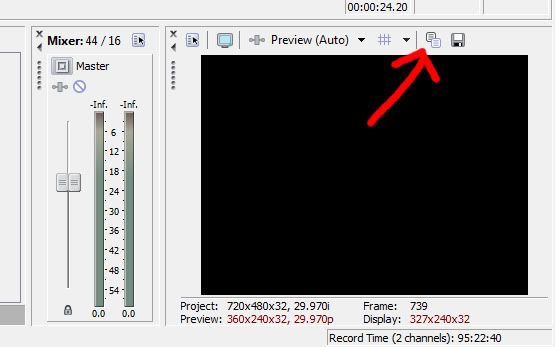
It's called "Copy Snapshot to Clipboard". Then paste it in Paint/Photoshop and save it, then drag it back into Sony Vegas. Hope this helps  |
|
| Back to top | |
|
Aislynn
Council Member
Joined: 03 Feb 2005
Posts: 35782
|
| Posted: Sun Jan 31, 2010 5:33 am |
|
Cool, Jaime, I've never used the copy to clipboard thing before so really didn't know what it did! 
What I do is this: (taken from the Sony Vegas All-In-One help thread )
| Aislynn wrote: | Cue your clip up to the moment you want it to pause at, then screencap it. There's a little button over the preview window that says Save snapshot to file.

You just click that and give it a name when prompted and it'll put that into your Project Media bin. I usually either split my vid clip at the point where I'm making the cap or go ahead and trim it to that point, then cap it so that when you just put the screencap on the timeline right after it, it'll look like the motion in the video paused. (You can try to find that exact same moment in the clip again and trim it after you've moved the cursor off of it but if you don't get the right one the video will "jerk" and the still pic will look like it suddenly snaps into another position. So I've found it's best to try and catch that exact moment rather than try to edit the clip to find it again later!  ) ) |
|
|
| Back to top | |
|
Jamielost
Advanced Vidder
Joined: 07 May 2008
Posts: 121
|
| Posted: Sun Jan 31, 2010 2:41 pm |
|
Ah, that would be a lot easier  I'd use Aislynn's method, Mystic I'd use Aislynn's method, Mystic |
|
| Back to top | |
|
Brooke
Expert Vidder
Joined: 01 Jul 2008
Posts: 24129
|
| Posted: Sat Feb 6, 2010 2:41 am |
|
Thank you to both for answering and helping.
I've been so crazy with school that I forgot I asked this. LOL. |
|
| Back to top | |
|

 LVI Home
 Search
 Memberlist