| Author | Message |
|---|
Charlies_Innocence
Expert Vidder

Joined: 24 Nov 2007
Posts: 4410
|
 Posted: Mon Dec 21, 2009 11:23 pm Post subject: Issues with Photoshop Posted: Mon Dec 21, 2009 11:23 pm Post subject: Issues with Photoshop |
|
I was trying to make myself a vidpic today, and could not for the life of me get the file size under 20KB.  And I've been able to do it before. Anyone know why it's doing that/how I could fix it? And I've been able to do it before. Anyone know why it's doing that/how I could fix it?
_________________

icon by becca |
|
| Back to top | |
 |
tjmack1986
Expert Vidder
Joined: 30 Mar 2008
Posts: 3436
|
| Posted: Tue Dec 22, 2009 12:12 am |
|
| Did you save it in .JPEG format? because anything else will cause the file to be under 20KB. That's a problem I ran into for the longest time. |
|
| Back to top | |
|
Aislynn
Council Member
Joined: 03 Feb 2005
Posts: 35782
|
| Posted: Tue Dec 22, 2009 3:38 am |
|
| I don't know if this does this in Photoshop or not but I've made a vid pic before in Paintshop, saved it as a .jpg and had it be too large to be uploaded to LVI. But if I go back and close out the file, then open it in Paintshop again and resave it as a .jpg, it'll be just fine. |
|
| Back to top | |
|
Polarbear
Expert Vidder

Joined: 26 Jun 2005
Posts: 13684
|
| Posted: Tue Dec 22, 2009 12:16 pm |
|
What I do is save it as a GIF file then open it up in paint and save it as a JPEG file. If you save it as a JPEG then resave it in paint it ends up being too big still ;/
_________________
 |
|
| Back to top | |
|
emmasholi
Council Member

Joined: 02 Mar 2008
Posts: 15576
|
| Posted: Tue Dec 22, 2009 12:28 pm |
|
Not sure what version of photoshop you use but I'm pretty sure it's the same for all of them...well, the versions I've used anyway. But it should be similar...
If you go to File > Save for Web & Devices... then this window should pop up
[spoiler:d22fb7528f]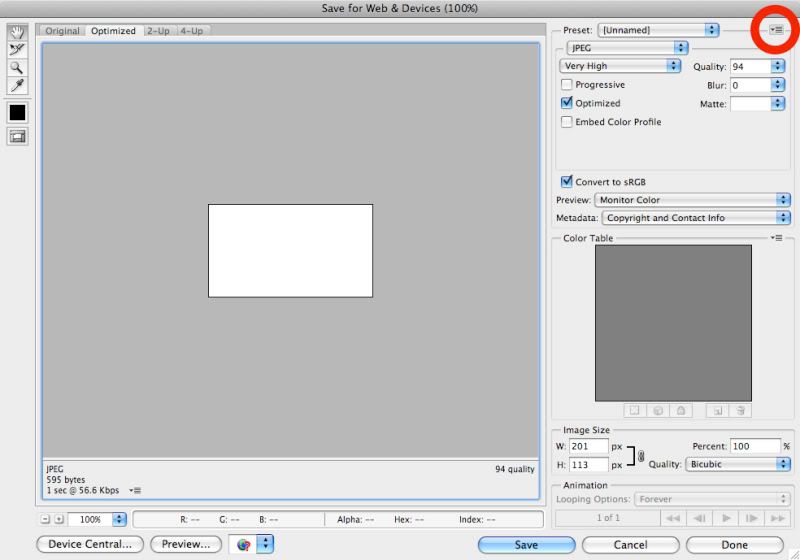 [/spoiler:d22fb7528f] [/spoiler:d22fb7528f]
I usually just leave the settings as they are and click the little thing that I've circled in red. It should come up with a little drop down menu. If you click on Optimize to File Size... this window should pop up
[spoiler:d22fb7528f]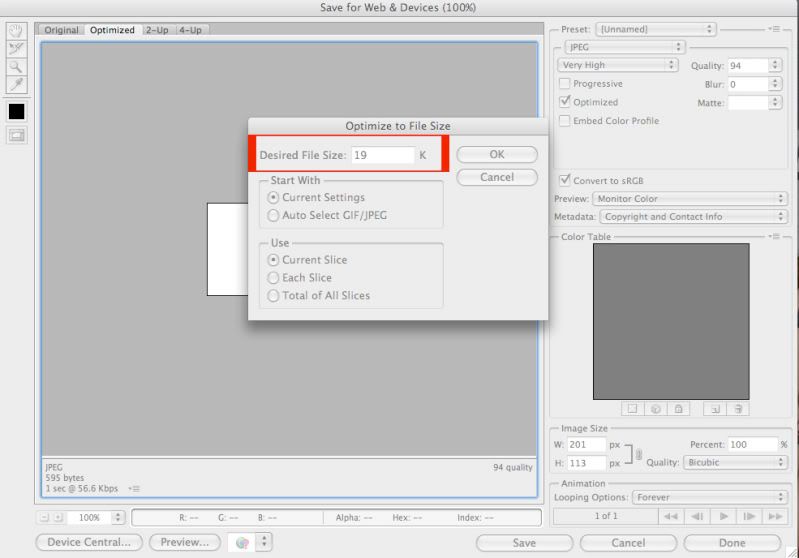 [/spoiler:d22fb7528f] [/spoiler:d22fb7528f]
Then just type in 19K (I usually use 19 rather than 20 b/c sometimes it goes over a little bit) then click ok and save.
Thats how I do it anyway, hope it helps 
_________________

 |
|
| Back to top | |
|

 LVI Home
 Search
 Memberlist