| Author | Message |
|---|
Korudo
Joined: 06 Jun 2009
Posts: 2
|
 Posted: Sat Jun 6, 2009 10:41 pm Post subject: Need help with an overlay/watermark. *Sony Vegas St. Plat. 9 Posted: Sat Jun 6, 2009 10:41 pm Post subject: Need help with an overlay/watermark. *Sony Vegas St. Plat. 9 |
|
| As a hobby i work on video game reviews and put them on Youtube. Recently I've been trying to work with a logo and putting it in the bottom right hand corner of the screen. The issue i am having is that unless i select "No" in the box that says "Maintain aspect ratio" under "Event pan/crop" (Which stretches my image and makes it look ugly) i can't get it to the very bottom of the corner. When i try to move it around down there, the logo gets cut off, and if i go lower it completely vanishes. I re-sized it and everything, but i can't move it to the very bottom corner of the video screen unless i choose to lose the aspect ratio, which defeats the purpose as it's stretched out and ugly. I can't figure out what to do to make it work properly. If anyone can provide any help, I'd TRULY appreciate it. Thanks so much in advance. |
|
| Back to top | |
 |
Jamielost
Advanced Vidder

Joined: 07 May 2008
Posts: 121
|
| Posted: Sat Jun 6, 2009 11:00 pm |
|
You could try putting the logo on a video track and changing the "track motion", like so:
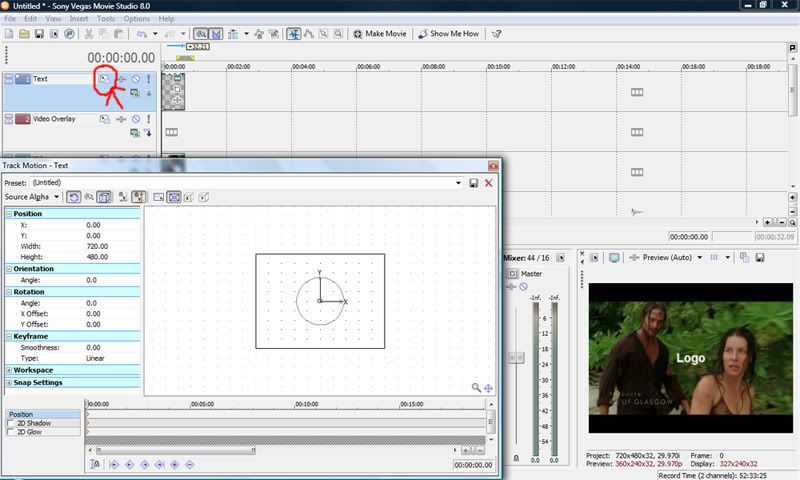
And then move the box down to whichever corner:
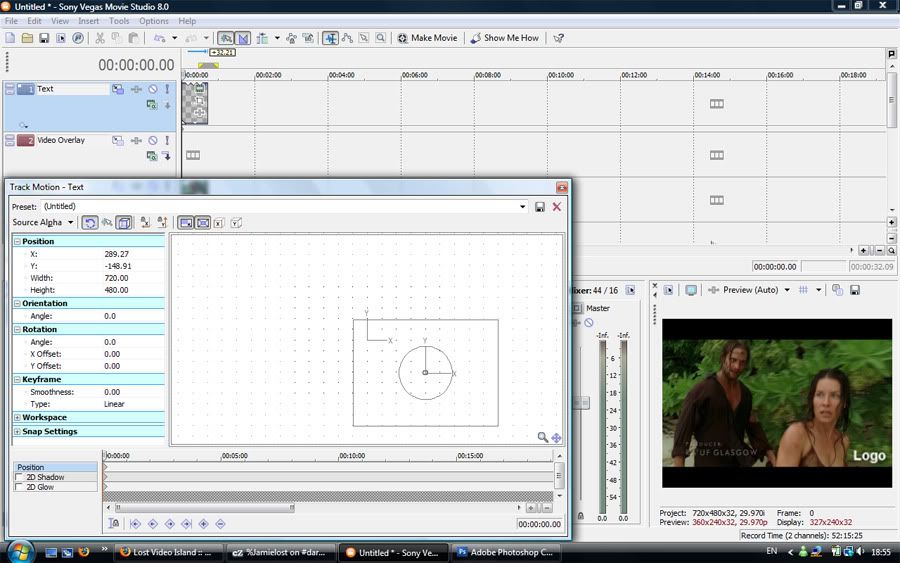
Make sure "prevent movement (X)" and "prevent movement (Y)" are not selected on the top bar of "track motion", otherwise it'll stop you moving the box up/down and right/left. This should work, but let me know if it doesn't.  |
|
| Back to top | |
|
Korudo
Joined: 06 Jun 2009
Posts: 2
|
| Posted: Sat Jun 6, 2009 11:24 pm |
|
| That absolutely worked! at first i followed your advice step by step, then tried it again without putting the logo on the video track and it still worked. It's because i was using "pan/crop" and moving it around within that menu. Thank you SO MUCH for your help! =) |
|
| Back to top | |
|
Jamielost
Advanced Vidder
Joined: 07 May 2008
Posts: 121
|
| Posted: Sat Jun 6, 2009 11:29 pm |
|
No problem -- glad it worked  |
|
| Back to top | |
|

 LVI Home
 Search
 Memberlist