| Author | Message |
|---|
lostzilla
Expert Vidder
Joined: 14 Mar 2005
Posts: 7246
|
 Posted: Tue Oct 4, 2005 5:43 am Posted: Tue Oct 4, 2005 5:43 am |
|
| ah nope I didnt' just convert the fourcc code and it's ready to go...without sound |
|
| Back to top | |
 |
Enchirito
Council Member
Joined: 27 Jan 2005
Posts: 2211
|
| Posted: Tue Oct 4, 2005 6:00 am |
|
convert the fourcc code?
and how do you get clips w/ sound then? |
|
| Back to top | |
|
lostzilla
Expert Vidder
Joined: 14 Mar 2005
Posts: 7246
|
| Posted: Tue Oct 4, 2005 6:10 am |
|
| well the sound works fine with .WMV, .MPEG and .MOV but if it's Xvid I have to convert the fourcc code. |
|
| Back to top | |
|
Hobbes
Council Member
Joined: 28 Jan 2005
Posts: 11211
|
| Posted: Tue Oct 4, 2005 7:42 am |
|
i.e. no sound... unless you want to convert every one of your episodes using Soundforge or Goldwave, but that would mean VERY big files sizeds and reduced quality... I just seperated the audio streams with Goldwave and saved those seperately  |
|
| Back to top | |
|
Enchirito
Council Member
Joined: 27 Jan 2005
Posts: 2211
|
| Posted: Wed Oct 5, 2005 5:14 am |
|
Anybody any good links to Vegas tutorials? Like for beginers.
It's so different from MediaStudio Pro that i need to re-learn the basics.  |
|
| Back to top | |
|
Hobbes
Council Member
Joined: 28 Jan 2005
Posts: 11211
|
| Posted: Wed Oct 5, 2005 6:01 am |
|
http://www.bb-video.net/
Vegas Tutorials
If it's not much better than Ulead, then you might want to consider not bothering with it E Your vids have always looked pro anyway. |
|
| Back to top | |
|
Enchirito
Council Member
Joined: 27 Jan 2005
Posts: 2211
|
| Posted: Thu Oct 6, 2005 3:31 am |
|
the reason i switched was because i was using a rather old mediastudio (6.5 when 8.0 is the newest) and it didn't handle Divx/Xvid very well. The sound never synced and if I wanted proper audio I would have to extract it to wav files and re-sync it manually. It was tedious.
I thought since Nate uses a lot of clips w/ sound (in his trailers) Vegas could do this easier. Maybe i was wrong. Maybe I need to find Mediastudio 8 somewhere... or finally learn Perimire (ha like i have the time to do any of that)
most of all i just want to make a new vid... been so long i'm afraid i may have forgotten how.  |
|
| Back to top | |
|
Hobbes
Council Member
Joined: 28 Jan 2005
Posts: 11211
|
| Posted: Thu Oct 6, 2005 4:19 am |
|
| well, once you get Vegas working right with the XVID files, it works fairly well. Just remember not to ever press the play button in the trimmer, just use the arrow keys No sound with this u8nfortunately, you have to synch them seperately here too... Nice effects and such though. I'm only halfway through my first video with it though so I shouldn't talk lol. |
|
| Back to top | |
|
Polarbear
Expert Vidder
Joined: 26 Jun 2005
Posts: 13684
|
| Posted: Thu Oct 6, 2005 4:34 am |
|
Some tips I've learnt:
- Hold down ctrl when stretching a clip and it speeds up/slows down the clip.
- If you stretch transitions it will only stretch them on the second clip so if you want it longer across the first clip you'll have to manually set it by moving the fade on the first clip longer along and then moving the second clip over to match the fade hope that made sense lol
- Wondering where text and junk is? It's under media generator on the view tab 
- An easy way with vegas to make audio clips sound better in a vid is to create a third audio track cut the music when the clip plays put it into the new track and put the db (volume of the track) down by 1/2 max so listening to the music you don't notice its changed but you can hear the clip better. You can also add audio effects to clips and reencode them in vegas pretty easy.
Share your vegas tips too please! It's a tough job being a vegas virgin hehe |
|
| Back to top | |
|
Hobbes
Council Member
Joined: 28 Jan 2005
Posts: 11211
|
| Posted: Thu Oct 6, 2005 5:14 am |
|
| Quote: | | Hold down ctrl when stretching a clip and it speeds up/slows down the clip. |
Thank you for that one that will help IMMENSELY. Stupid long process of adding stupid video envelope...
| Quote: |
- An easy way with vegas to make audio clips sound better in a vid is to create a third audio track cut the music when the clip plays put it into the new track and put the db (volume of the track) down by 1/2 max so listening to the music you don't notice its changed but you can hear the clip better. You can also add audio effects to clips and reencode them in vegas pretty easy. |
Ditto!
Uhhh.... all I canthink of:
-save every bloody thing you do as a template
-always remember to cancel the building peaks process for episodes  (well DUH) (well DUH)
-be very gentle with it
- try your screen resolution at as big as it can get. it helps a lot...
-always preview in draft...
- taking pictures takes the actual preview screen's pic, so do it with best quality
-event pan/crop can be your best friend if you let it be.
-use markers whenever you make a cut, you can use them later.
-there is no fade to black/white! you must use brightness! But throw in some contrast too, it looks better.... go about half contrast, half brighten , with the contrast center at its lowest. |
|
| Back to top | |
|
Hollywood
Expert Vidder
Joined: 19 Mar 2005
Posts: 3478
|
| Posted: Tue Oct 11, 2005 3:00 am |
|
Ok I have a small question to ask of another Vegas user. I've only been vidding with Vegas for about 4 months or so and sadly to say I have no idea how to save a video in small format. I usually make the video first in Vegas and save it when I'm finished but the vid always saves as a really big, HUGE ass file (atleast a couple hundred MB's anyway... ) and then I upload the vid into WMM and save it small in there, but my WMM is totally F*CKING up on me right now and thats why I need to know how to save it small in Vegas. Could someone please help me?  |
|
| Back to top | |
|
Polarbear
Expert Vidder
Joined: 26 Jun 2005
Posts: 13684
|
| Posted: Tue Oct 11, 2005 1:57 pm |
|
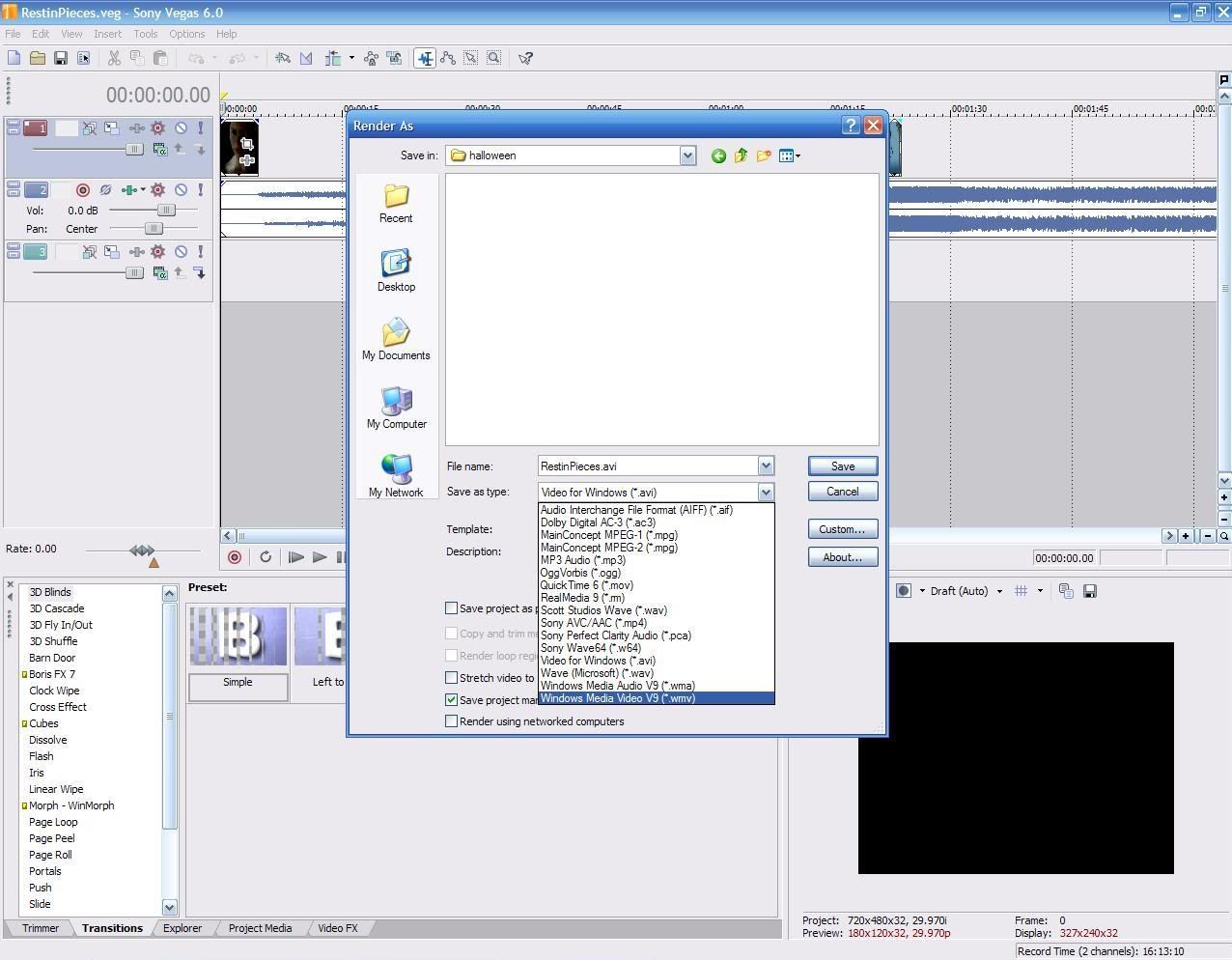
then select 512 as the setting on the second one. |
|
| Back to top | |
|
Hollywood
Expert Vidder
Joined: 19 Mar 2005
Posts: 3478
|
| Posted: Tue Oct 11, 2005 3:38 pm |
|
THANK YOU SO MUCH Pauly!!!! *Hugs and kisses* 
That helped me tremendously.
Thanks you, thank you, THANK YOU!!!!
You rock!!!!   |
|
| Back to top | |
|

 LVI Home
 Search
 Memberlist