| Author | Message |
|---|
riay_night
Advanced Vidder
Joined: 14 Jun 2007
Posts: 2591
|
 Posted: Mon Jun 16, 2008 8:05 pm Post subject: PSP 7 Help Posted: Mon Jun 16, 2008 8:05 pm Post subject: PSP 7 Help |
|
Hey hey everyone!
So I feel like my graphics suck and are really boring, and somehow I just can't get them to look like everyone elses.
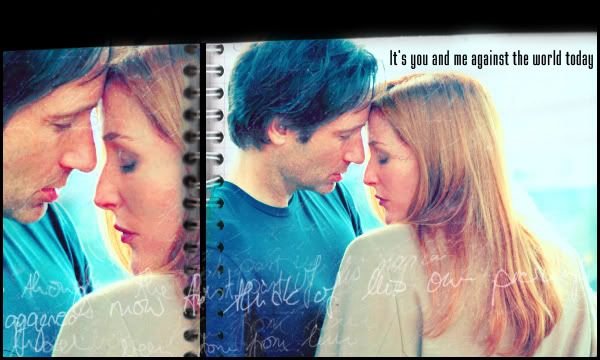
I would really like to know how to do this scratchy effect, shown below. Looks like theres some sort of filter over it... or something...
This one just has some cool coloring effects. I really need help with coloring. I hardly know how to tint anything, unless I go to 'Adjust Color Balance" and it never pulls results like these...

Thanks for any help you may provide.
_________________
<3 Jourdan
Banner and Avi by me. I take requests. |
|
| Back to top | |
 |
IntoTheVoid
Expert Vidder
Joined: 09 Apr 2006
Posts: 2407
|
| Posted: Thu Jun 19, 2008 10:08 pm |
|
http://community.livejournal.com/icon_tutorial/

_________________
"Jack is the guy she should be with.
She does genuinely love him.
And she knows that he would take excellent care of her." - Damon Lindelof |
|
| Back to top | |
|
Aislynn
Council Member
Joined: 03 Feb 2005
Posts: 35782
|
| Posted: Thu Jun 19, 2008 11:26 pm |
|
I use that same community Elle mentioned a lot, they even have some tutorials specifically for Paintshop (which is what I also have, though it's PSP8 ). I hope you don't have to be a member to see these in the comm's memories.
There's also a comm just for PSP8 (but they have a PSP7 affiliate AND a lot of things will work fine from one version to another, or so I've found! Even some Photoshop tuts will work in theory even if PSP doesn't have selective coloring and other things only PS has).
And, dude, your graphics are totally not sucky or boring!  Oh and to answer your question about the first banner, I'd say that's definitely a scratch layer of some sort as well as a texture that's creating that "notebook" effect. One of the coolest things I've learned in graphics-making so far has been how to use the layer settings (like darken, multiply, screen, burn, etc.). I don't know where they are in PSP7 but in 8 you find them by rolling the palette over where you can control the opacity of each layer. It's usually set to "normal" by default and when you click it, it gives you all of the different settings that are available. You can get really interesting results with textures and layer settings! Oh and to answer your question about the first banner, I'd say that's definitely a scratch layer of some sort as well as a texture that's creating that "notebook" effect. One of the coolest things I've learned in graphics-making so far has been how to use the layer settings (like darken, multiply, screen, burn, etc.). I don't know where they are in PSP7 but in 8 you find them by rolling the palette over where you can control the opacity of each layer. It's usually set to "normal" by default and when you click it, it gives you all of the different settings that are available. You can get really interesting results with textures and layer settings! |
|
| Back to top | |
|
riay_night
Advanced Vidder
Joined: 14 Jun 2007
Posts: 2591
|
| Posted: Thu Jun 19, 2008 11:35 pm |
|
Thanks so much Elle!
And thank you too Ais!
Well, I checked out that community, and a lot of the tutorials said things like PSPX2... is that some new version or something? I have little ol PSP7, and I don't know if I should upgrade or not...
Lastly, do either of you know of good brushes or brush sites with the JBR format that will work in PSP? I hardly have any cool brushes, and it would be awesome if I could find some.
Thank you guys so much!!!!!!!!!!
_________________
<3 Jourdan
Banner and Avi by me. I take requests. |
|
| Back to top | |
|
Charmed_Charlee
Expert Vidder
Joined: 03 Jun 2006
Posts: 18232
|
| Posted: Thu Jun 19, 2008 11:49 pm |
|
Oooh I also use the site Elle mentioned, it's really good  |
|
| Back to top | |
|

 LVI Home
 Search
 Memberlist