 |
Lost Video Island
A Multifandom Vidding site
|
| Author | Message |
|---|
phoenix39
Novice Vidder
Joined: 04 Mar 2005
Posts: 479
|
 Posted: Sun Oct 14, 2007 12:43 am Post subject: Tutorial: Changing Default Video Still on YouTube Posted: Sun Oct 14, 2007 12:43 am Post subject: Tutorial: Changing Default Video Still on YouTube |
|
Yes folks, it is possible! One of my fanvids is a Mun/Jun triangle of angst and the very middle frame is Ana-Lucia. She's only in the video for a total of two seconds and I really wanted to change it to a frame that better described the video, so I finally figured out how to change it to a frame of Sun wallowing at the airport.
In this tutorial, I'm using one of Heroes vids, but I'm pretty sure you'll get the idea.
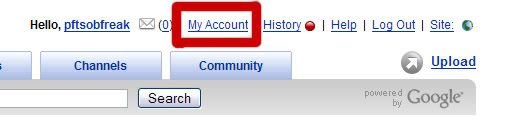
Step One: Go to YouTube and click on My Account.
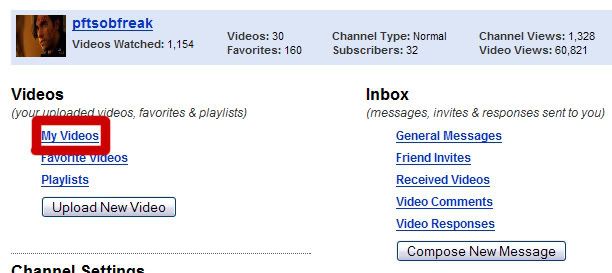
Step Two: Click on My Videos.
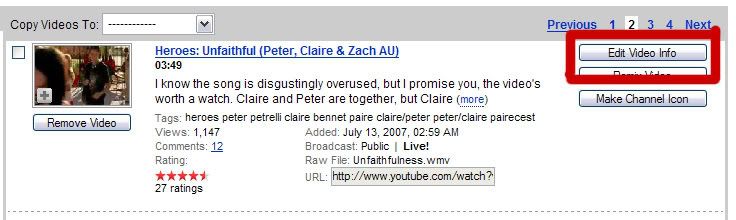
Step Three: Click on Edit Video Info.
Step Four: Select the frame you think will either
a) best describe your video
b) has the best effects to attract viewers.
For this one, I chose the frame with the split screen and the pink tinge to let people know that it's a Peter/Claire video and that I worked hard to accomplish the effects.
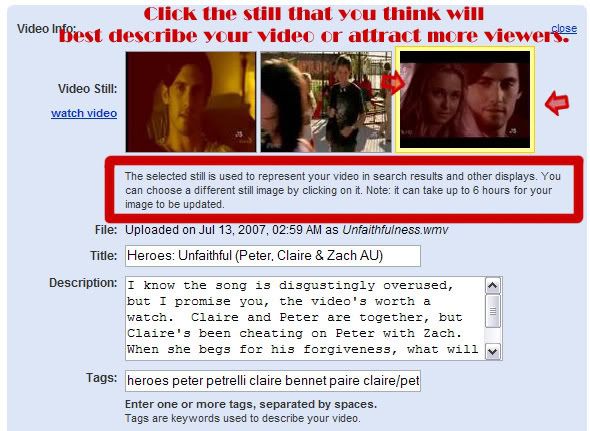
Remember: Don't spaz out if the frame doesn't change right away. It says that it can take up to several hours. |
|
| Back to top | |
 |
littleton_pace
Council Member
Joined: 16 Nov 2006
Posts: 55699
|
| Posted: Sun Oct 14, 2007 4:47 am |
|
Lol, i already knew this, didnt other people? nice idea for a tutorial tho  |
|
| Back to top | |
|
Izzy94
Advanced Vidder
Joined: 08 Feb 2007
Posts: 485
|
| Posted: Sun Oct 14, 2007 10:59 am |
|
Yeh I found this out a while ago to.
Its still good though  |
|
| Back to top | |
|
Powered by phpBB © 2001, 2005 phpBB Group · archived 2026 |
 LVI Home
 Search
 Memberlist