| Author | Message |
|---|
phoenix39
Novice Vidder

Joined: 04 Mar 2005
Posts: 479
|
 Posted: Sat May 26, 2007 4:11 am Post subject: Tutorial: Getting the DivX watermark out Posted: Sat May 26, 2007 4:11 am Post subject: Tutorial: Getting the DivX watermark out |
|
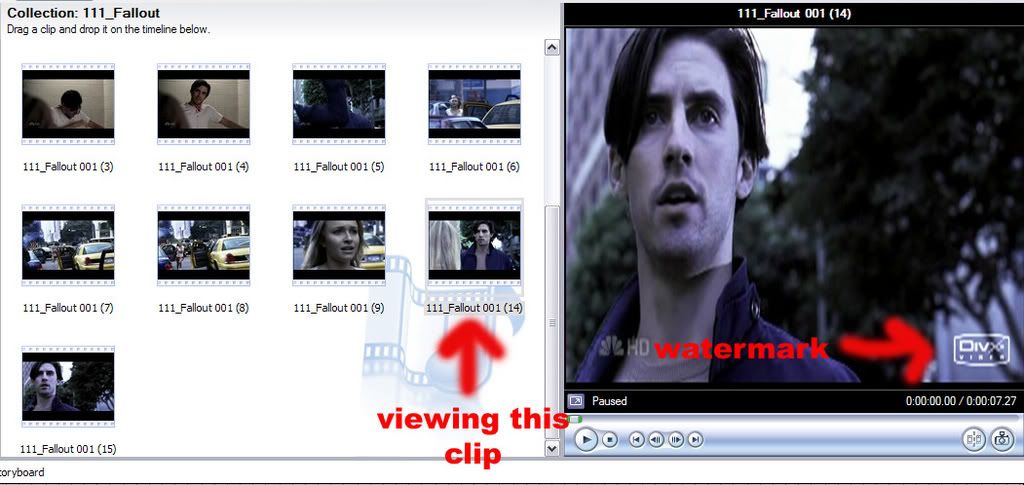
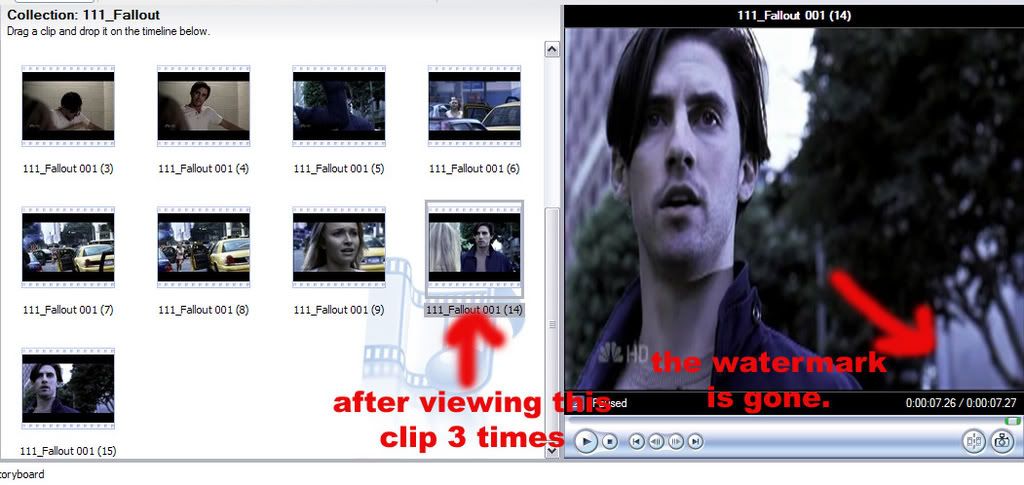
Have you ever seen (or made) a video where the DivX watermark is just popping up randomly throughout the video. Well, I figured out to get it out and it's very simple. I use Windows Movie 2. I'm not sure if it works with other programs, but here it is.
After you cut the clip you want, but BEFORE you drag it down to the Timeline, view it it in side window until the DivX watermark disappears. You may have to view it multiple times, deprending on the length. But it's really that simple. Once the watermark disappears, you can drag it down then your video will be watermark free (aside from network watermarks and your own). But if you cut the clip shorter, then you'll have to rewatch it.
Images. Click for larger view.
EDIT: A MUCH SIMPLER WAY
| thefilmchick wrote: | You can also remove the watermark entirely in the divx configuration tool.
This is located at
YOUR BASIC PROGRAM FILES DIRECTORY\DivX\DivX Codec\config.exe
Toolbar tab (in the middle), and uncheck "Show DivX watermark."
There it goes for good, and without repeated viewings.
Hope this helps! |
_________________
-Jane
Last edited by phoenix39 on Mon Jun 11, 2007 8:37 am; edited 3 times in total |
|
| Back to top | |
 |
Aislynn
Council Member
Joined: 03 Feb 2005
Posts: 35782
|
| Posted: Sat May 26, 2007 11:05 pm |
|
Hey, I didn't know you could do that! That's so cool!  Thanks so much for sharing! Thanks so much for sharing!  |
|
| Back to top | |
|
phoenix39
Novice Vidder
Joined: 04 Mar 2005
Posts: 479
|
| Posted: Sun May 27, 2007 2:02 am |
|
No problem at all.
It was just one of those things I accidently discovered while taking caps.
_________________
-Jane |
|
| Back to top | |
|
thefilmchick
Expert Vidder
Joined: 22 May 2006
Posts: 4030
|
| Posted: Wed May 30, 2007 7:34 am |
|
You can also remove the watermark entirely in the divx configuration tool.
This is located at
YOUR BASIC PROGRAM FILES DIRECTORY\DivX\DivX Codec\config.exe
Toolbar tab (in the middle), and uncheck "Show DivX watermark."
There it goes for good, and without repeated viewings.
Hope this helps!
_________________
I saw a werewolf drinking a pina colada at Trader Vic's. His hair was perfect.
|
|
| Back to top | |
|
phoenix39
Novice Vidder
Joined: 04 Mar 2005
Posts: 479
|
| Posted: Mon Jun 11, 2007 8:35 am |
|
That is awesome! Thanks so much, filmchick! *hugs*
_________________
-Jane |
|
| Back to top | |
|

 LVI Home
 Search
 Memberlist