| Profile |
Welcome to Lost Video Island Forums, Guest.
Register
|
| Information |
Our users have posted a total of 329530 articles
We have 4063 registered users
The newest registered user is omg new
|
| All about greyhaven1435 |
Viewing profile :: greyhaven1435
Joined: 7830 Days
Posts: 5
Location: Vermont, USA
|
|
| Forum |
Topics |
Posts |
| LVI Videos |
Lost Videos
Discuss the Lost videos of LVI. All constructive criticism is welcome!
|
7267
|
69204
|
Other Fandoms A – G
All your favorites, from "Alf" to "Golden Girls"!
|
416
|
3167
|
Other Fandoms H – N
This one is pretty much just for Harry Potter.
|
230
|
1725
|
Other Fandoms O – Z
There's no place like home.
|
815
|
6151
|
Multi-fandom Videos
For all those vids mixin', matchin', and minglin' fandoms.
|
554
|
4856
|
| The Members' Section |
Contest Talk
Discuss current and past LVI contests.
|
322
|
8792
|
Requests
Post your requests for videos featuring your favorite songs and pairings.
|
636
|
3003
|
Fan Art
Post your fan art, wallpapers, and fanfic right here!
|
440
|
17120
|
The Vidders
Discuss the vidders of LVI, upcoming videos, etc!
|
274
|
1969
|
OC Discussion
Talk & share your Original Characters here!
|
19
|
340
|
| Tech Talk |
Site Talk
Come here to see any new announcements about the site, or report any bugs or problems you may be having.
|
421
|
6503
|
Artistic Vidding Help
Discuss the artistic aspect of vidding and how you can improve your vids.
|
254
|
1998
|
Technical Vidding Help
Discuss the technical aspects of vidding.
|
1092
|
16198
|
| Fandom Talk |
Lost Talk
For discussion of all things Lost.
|
941
|
18566
|
Other Fandoms Talk
Chat about movies, tv shows and music in here!
|
471
|
10572
|
| Other Stuff |
Whatever
Talk about anything that doesn't fit elsewhere. No spam though.
|
1081
|
24121
|
SPAM Central
Where the spam goes! No topic required.
|
2
|
47
|
| Events |
LVI's 'Video of the Year' Tournament!
Every year LVI members vote to determine the Best Video of the Year. Vote here during the tournament, or poke around to see past votes.
|
2
|
2
|
LVI's 'Member's Choice' Competition
Here, every year, the best vids from each category on LVI are found and awarded shiny trinkets. Come in and vote!
|
2
|
2
|
| Delete? help me please!!! |
Author:
zandra ::
Posted:
Sun Jan 08, 2006 5:22 pm
hi, i need to delete my account, i'll sign up again at another time, please i really need help!!!! how can i delete my account? please someone help!!!
_________________
Mercedes Viano
|
| help please |
Author:
lost without boone ::
Posted:
Sun Jan 08, 2006 1:48 pm
hi am new here and i was wondering how do you get a pic under ur comment???
|
| Help with Sony Vegas feat. a beginner's tutorial |
Author:
Polarbear ::
Posted:
Sun Jan 08, 2006 10:58 am
Note: You're in the right thread if you have a new question about Sony Vegas. If you just want to browse the answers and other tutorials already written in this thread, please see the Sony Vegas All-In-One Help Thread. Again, if you have a new question, please post it here in this thread. 
Sony Vegas Video Tutorial by Pauly
Importing the video files
The first thing you will need to do to start your video is import the clips or episodes of Lost. Unfortunately Vegas doesn't like avis too much but there is a way around having Vegas crash on you when importing avis. That is by changing the FourCC Code of the avi files.
Download AVI FourCC Code changer from here:
http://www.inmatrix.com/files/avic_download.shtml
Extract the zip file and run the program.
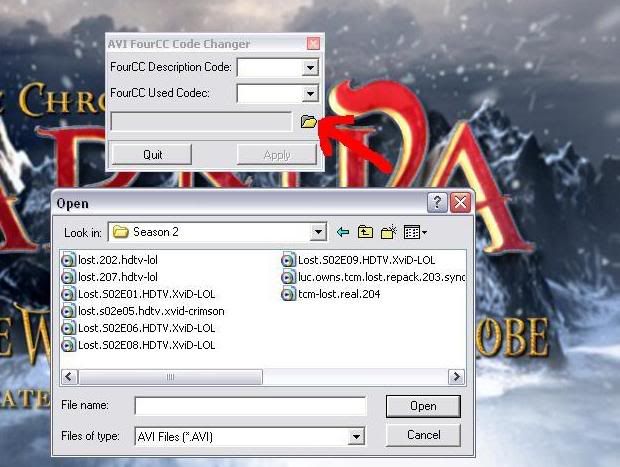
Open up your avi file using the explorer button in the program and enter "DIVX" in both boxes. Click apply and your avi file should now be able to be imported into Vegas. Alternatively you can encode the avis to a high end MPEG or WMV format.
The Trimmer
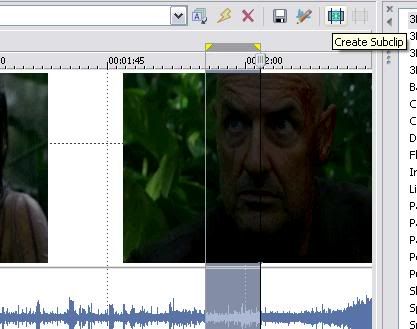
This is the tool you will use in Vegas to cut clips out you want to use from the movie files. Right click on the episode/clip you want to edit and click "Open in Trimmer." Hold down the left mouse button and drag it along and you can highlight a section of the space on the trimmer. Zoom in and out by using the mouse wheel. You can preview the selected clip in the preview window by using the play functions at the bottom of the trimmer. Once you're satisfied click the Create Subclip button (see pic) and name it if you want. Your clip has now been added to the project media tab.
The Timeline
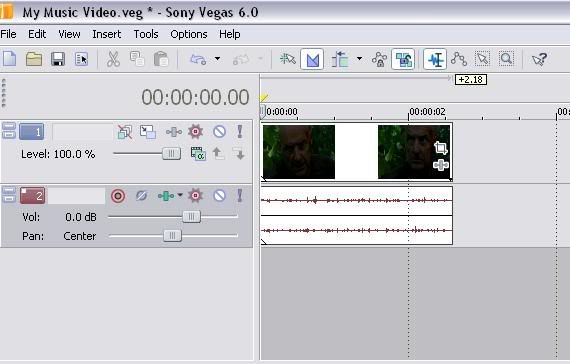
At the top of the screen there is a timeline which is where you edit your video. Select the clip you just made and place it onto the timeline. You have created two layers. The top one is the video and the bottom is the audio. I will get rid of the audio layer as when making a music video you shouldn't usually need the sound from an episode. Add your song underneath the video clip and it will come up as an audio layer.
Basic Video Effects
Notice how the clip looks rather dark in the small window. Let's brigten it up! Select the Video effects tab and the Brightness and Contrast Video effect. Change the setting of the preview window from draft to preview so that you get a better idea of how it will look. Change the brightness and contrast levels until you are happy with it.

Creating Transitions
When you have a few clips in order on the timeline you will probably want to add some transitions to make your video flow better or to highlight a beat in the song etc. Click on the transitions tab. The most common type of transitons are Cross-Fade, Linear Wipe and Flash. Cross Fade will let you fade between different clips or fade into/from black. This is the generic transition in Vegas and doesn't appear in the transitions tab. Linear wipe lets you wipe away a particular scene onto another one from any angle. Flash is very useful to highlight an important beat in the song.
Using the Crossfade transition
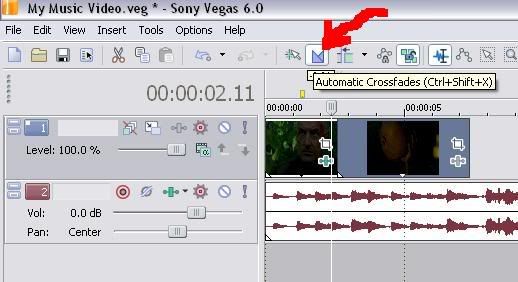
The easist way to create transitions is to put automatic crossfades on. Turn it on by selecting the appropiate button on the toolist at the top (see pic.)
Hold down the left mouse button on the clip and drag it along over the clip you want to create a transtion with. This will have created the generic cross fade transition. You can replace it with any other transition if you want and it wil stay the same length you selected.
Cropping, Panning and Rotating
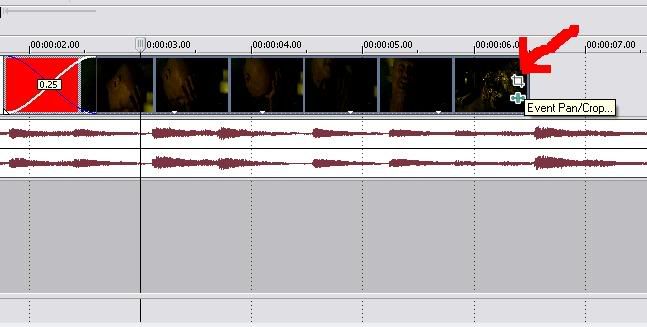
This is a very useful function when avoiding the dreaded credits that come up on certain clips. You are able to zoom in on a particular clip and cut out the credits from it. Select the Event Pan/Crop function at the end of a clip (see pic.)
Move the cursor over the bottom of the square and hold the left mouse button down and drag it towards you and from you to zoom in and out. You can also rotate the clip by selecting the corners of the square and moving it around. You can pan across the clip by selecting the middle of the square and moving it around.
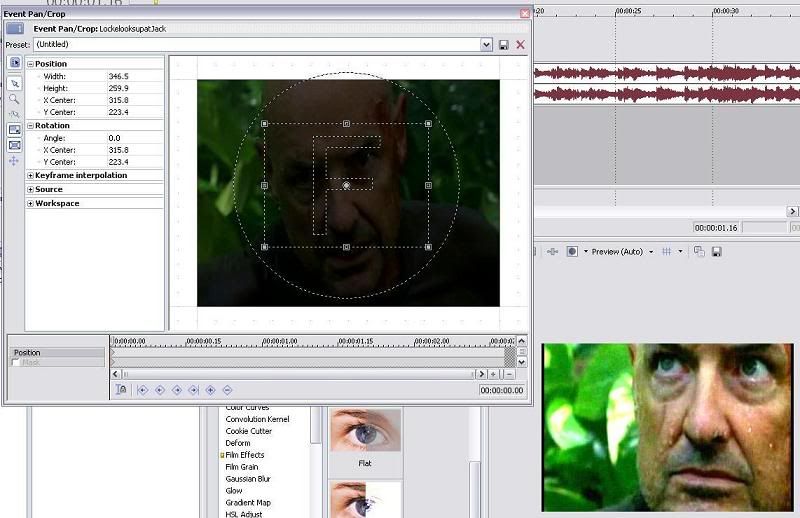
General Editing Tips
Speeding up and slowing down: The easist way to speed up and slow down a clip is to hold down ctrl when dragging a clip to extend or shorten it.
Splitting Clips: Pressing 's' will split a clip in two.
|
| Beginners Page |
Author:
Hobbes ::
Posted:
Sun Jan 08, 2006 4:09 am
You may have noticed a change on the submit page. 
http://www.lostvideo.net/submit.php
It leads to a new page: http://www.lostvideo.net/beginners.php
We now have an official beginners help section to put guides, training videos, and anythign else that';s needed. If any of you want to contribte a training video, or make one of our much needed guides, then please go ahead, and you can find details on the begnners page.
|
| I need direction from the cliche police! |
Author:
pomegranny ::
Posted:
Sun Jan 08, 2006 3:56 am
So I'm working on my first video (Jack/ Kate angsty), and since I haven't seen a majority of the videos on this site, I'm not sure if anything I'm doing has been done before. In particular, I'm using the palm-plane clip from the pilot for the intro to the vid, then ending with Jack throwing the plane. It fits w/ the music I think, but it seems like this clip would be used a lot. Does anyone know if this is true? I'm trying to steer clear of cliches, since I know Jack/Kate videos are popular. Thanks for any help!
|
|
| Poll question |
|
Which contest idea should we use for November?
|
|
